The push to have AI agents in customer service operations comes directly from the top. In a Gartner survey of 321 customer service leaders, 91% reported pressure from executive leadership to implement AI. (Gartner, 2026)
Adoption is high, but the value companies gain from it varies widely. Gartner predicts that most AI projects unsupported by AI-ready data will be abandoned by the end of the year. (Gartner, 2025). Intercom’s 2026 customer service transformation report points the same way, with many of the 2,400 surveyed teams stating their AI is still doing narrow work like answering simple questions. (Intercom, 2026)
In customer support operations, AI-ready data mostly refers to in house knowledge content, previous support conversations and processes which set out how conversations move from first contact to resolution. An AI agent answers queries from the information & guidance you give and escalates interactions along the journey you’ve built, so if any of those are patchy, the agent will underperform, regardless of the platform you choose.
These gaps are rarely a surprise for the people doing the work.
"Anyone working in operations will recognise the same recurring challenges: outdated knowledge with unclear ownership, metrics that don’t give you the right insight, and workflows or system configurations that haven’t been designed for optimisation. Getting those foundations right is what enables you to improve, scale and deliver a better experience." Ann-Marie Collins, Transformation Manager at Otonomee
1. Is your knowledge base accurate, current and owned?
Of the five areas, this is the one that matters the most. Content is where AI agents most often fail, and the problems they have tend to be specific:
- Articles that give slightly different answers for the same process
- AI agents that provide different information from the one available in the public knowledge base
- Processes that change but are not updated in the knowledge base
- Lengthy articles that don’t directly answer customer questions, in the way customers ask them.
A human agent often knows from experience which of the two conflicting articles is right, or who to go to for the right information. But an AI agent doesn’t.
“If you have duplication across articles, that’s going to confuse the AI model,” says Ann-Marie.
Coverage is the other gap. New products often get launched without any knowledge base updates and then it can be weeks before the content catches up, or answers mostly live inside internal drives, old FAQs or inside the heads of your agents. To make this work, someone must own it. Ironically, AI is making this much more apparent. Not so long ago, software release cycles were annual, giving everyone time to align and to update web copy and FAQs. With AI, release cycles can be daily, and if communication is not watertight, it is very easy for web content and FAQs to become redundant quickly. And if robust processes are not in place, the issue compounds.
Customer service leaders are already moving in this direction, with 58% aiming to upskill agents into knowledge management specialists, as they recognise the need for stronger knowledge governance practices to support both AI agents and customers’ self-service.
2. Do you know what your customers contact you about?
Most helpdesks have categories and tags set up for reporting by whoever configured the tool at the start but rarely show which contacts are repetitive and high-volume, which is where automation should start.
This choice makes a real difference to the result.
“You can focus on the low-hanging fruit and achieve 5% automation or look more strategically at where automation can deliver 20% and create significantly greater impact.” says Ann-Marie.
Picking the right queries to start with comes from analysing your contact data, not guessing.
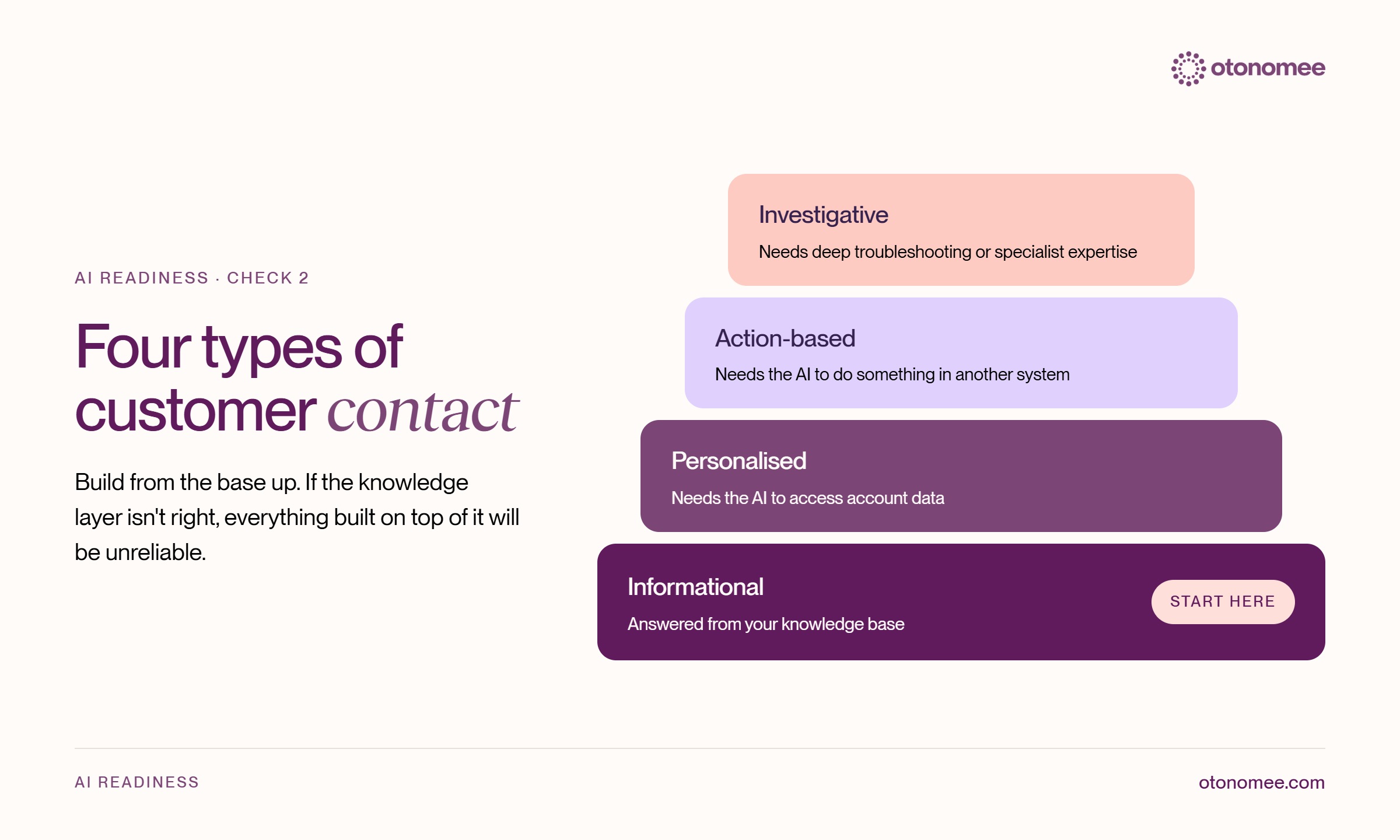
It helps to sort contacts into four types:
Informational: A question that can be answered from a knowledge base.
Personalised: Something that requires AI to access the account data.
Action-based: Needs AI to do something in another system.
Investigative: Needs deep troubleshooting or advanced expertise.
Many implementations rush to the second and third types, not realising that if the knowledge layer underneath isn’t right, everything built on top of it will be unreliable.
3. Knowing when to escalate and why
Not every customer query should be handled by AI. Certain conversations, particularly sensitive topics, financial concerns or situations requiring empathy and judgement, need to be routed to a human agent. What’s important is designing your system so that your customers get the right support, at the right time, from the right agent.
Where escalation pathways are clear, predictable and repeatable, AI can identify the issue, gather the relevant information and, if needed, route the conversation directly to a Tier 2 specialist. By bypassing any Tier 1 intervention, you can significantly reduce resolution times and allow human agents to focus on conversations that genuinely require their expertise.
In a Gartner survey conducted early this year, 87% of B2B and B2C customers stated that it is essential for companies using AI agents to provide an option to reach a human agent (Gartner, 2026). Customers should be able to access human support when their issue requires it or when they explicitly request it. Building your conversation flow to be frictionless is essential for a positive customer experience.
Escalation routes often grow informally, especially in smaller teams. But when companies scale, having information being copy-pasted into different platforms that are not connected, means neither a person nor an AI agent can see the full picture.
The first step to fix this is to map escalation routes end-to-end:
- Where does a conversation go when the front-line agents can’t resolve it? Is there clear mapping to the right system or team?
- How long does it take and is context retained so the customer doesn’t have to repeat themselves?
- Which escalations can be automated? Are there repeatable triggers that AI can identify, and which situations require further investigation or human judgement?
4. Can you define what a good answer looks like?
If you can’t describe what a good interaction looks like for your human team, you won’t be able to measure an AI agent against it. You need to take a proper look at your quality scorecard, tone of voice guidelines and service standards, and make sure it’s all written down clearly and being applied uniformly across teams.
Sampling can be a limiting factor as well. Most QA teams can only review a small sample of conversations. Once an AI agent is answering a large share of your customers, a small sample will create blind spots. Implementing a strong quality solution that scores both human & AI interactions will give a complete view of the service your customers receive and the cases that need review.
5. Who will continue to own the AI agent after launch, and what will they measure?
The most common failure comes after the go-live.
“We’ve all seen it happen — a new system launches, it’s the shiny new thing for a month, and by month two, the momentum has already started to fade.” says Ann-Marie.
Ownership means there’s someone assigned to review unresolved conversations, fix content gaps and adjust escalation rules on a regular basis. Intercom’s report shows this work becoming part of the job, with new roles becoming standard and 40% of teams reporting that agents are spending more time training and optimising AI systems. (Intercom, 2026)
That person also needs metrics that are specific to business objectives. Some businesses fall into the trap of reporting on what’s available to them, rather than what’s important for them. A helpdesk’s default dashboard shows what the tool can count but won’t tell you why your escalation rate went up or who is responsible for fixing it. If escalations from your AI agent to your human team are rising, someone needs to find the root cause and close the loop.
What if you’re not ready?
An honest AI readiness assessment has three possible outcomes:
- You are ready to automate now
- You need to do some foundational work first and then automate
- An AI agent isn’t the right move yet for your business. (Volume may be too low for setup and upkeep to payback, or most of your customers’ queries may be too complex to automate)
And these five areas outlined above are not the only blockers. Others that come up often include:
- A team without capacity to take on the work or too wary of change
- A system only one person knows how to run
- An AI feature switched off after a bad experience and never turned back on
These are all worth naming because an AI agent won’t fix them, and knowing where you stand before you spend is worth a lot.
Most of the fixes also improve your overall customer support whether you add AI to your stack or not. Clearer content, with established categories, faster escalations and a shared quality standard help human agent teams just as much as automated ones.
The fixes also help keep your people at the centre. Gartner predicts that by 2027, 50% of companies that planned big cuts to their customer support teams will abandon those plans. AI is very good at routine, predictable, well-defined tasks, but still struggles with sensitivity and anything high-risk.
How Otonomee’s AI Readiness Assessment works
Our AI Readiness Assessment covers these five areas:
- Escalation pathways
- Taxonomy and categorisation
- Knowledge and content
- Quality
- Reporting
You receive a report for each area and a consolidated plan that separates what you can start now from what belongs in an AI agent implementation.
It’s platform-agnostic, and unlike vendors’ assessments that start from what their product can do, ours starts from how your support operation works and is carried out by people who run complex customer support operations every day.
If an AI agent is on your roadmap, start with a conversation.
Summary
AI agents don’t operate in isolation. Their performance depends on a few things; the quality of the knowledge bases behind them and the data and people behind them. Before choosing an AI tool or implementing an AI agent, support leaders need to understand where their business stands today. What are their customers asking, where conversations go when the customer doesn’t get answers and who will own the implementation once it’s live. Getting these foundations right is critical. It creates a stronger, more measurable support operation and a better customer experience, whether you choose to automate today or further down the line.